On Kadence WP – a commercial WordPress theme I can at the very least tolerate

This is big, everybody

Recently I’ve been looking at my offering as my freelance WordPress development business. Sure I am confident in my abilities, but I’m always looking for ways to improve.

It’s no secret the majority of my work is at a higher price point. It’s with good reason: it’s custom work, often built from scratch, to high standards. I’m confident in my code, and that’s what people pay for.

However, whilst this works for the majority of my clients, there are odd cases where quick, simple sites are a struggle to price. I’ve built sites on to top of other themes before, and happy to communicate that with a client that I am using a child theme.

However, they have a habit of looking the same, which is generally looking like a TwentyTwenty child theme. It’s fine, and the client is happy, but I’m not 100% satisfied myself.

Sure, there are other themes, but I tend to find they are bloated mess and I struggle using them, using custom admin setups and – more often than not – the demo doesn’t look like what it looks like out of the box.

Recently, however, I saw a question from noted newsletter peddler Remkus de Vries, and read the replies.

From the replies, one theme, from names that I trust and admire, kept cropping up. I also had a potential lead that came through that explicitly asked for help in that theme.

Kadence WP

So – with the philosophy shared in my last side project build – where I make sure each side project is a learning experience, I reached into my box of domains, pulled out one – Dad Joke Ipsum – and set aside a day to build it.

The side project – Dad Joke Ipsum

So the idea behind Dad Joke Ipsum is a tool for web designers to generate dummy text for their designs. However the dummy text will be all dad jokes. After crowdsourcing a bunch of dad jokes (as well as using ChatGPT – did you know ChatGPT knows only 25 dad jokes? Dads: you’re safe), there was a bit of developmental work to build the generator with a database behind it. Ideally I didn’t want to be spending a huge amount of time on the theme, so Kadence WP made sense.

So, after soft launching the website at WordCamp Europe, I was impressed with Kadence WP, in a number of ways.

Kadence WP – Why I like it

1. It’s fast

So, the site is hosted on a bog standard SiteGround installation, and with a few images. Obviously other sites have a lot more images, but even using the SiteGround optimiser, it scores in the 90’s on mobile (though the largest contentful paint seems to be determined by the joke pulled from the database).

Check out the speed!

This bodes incredibly well as there isn’t a huge overhead from the theme itself, suggesting it is incredibly efficiently coded, with very little bloat. Also it scores highly in accessibility (the only error is me being odd with my heading tags placements). So it bodes well for a site that I’m trying to pick up traffic.

2. It doesn’t take over the admin

Honestly, I’m sick of themes that don’t use standard UI’s and take over the admin. Kadence WP very much does not. Logging in after installing and everything is either in the default Customiser, or within the posts. If anything I struggled to find where everything is located.

The theme uses the default customiser

It’s everything you need, though even though I could do most of what I wanted to without one. I do have a child theme. This is more for structuring the dad joke archive page and individual jokes.

Once you get your head around it (which is incredibly straightforward if you use Gutenberg on a daily basis), then you’re good.

3. Free is more than suitable

So everything you see on Dad Joke Ipsum is using the free version. I’ve not used the premium version, just a bit of basic customisation, and I can use the Gutenberg editor to build out the pages. There is a premium version which includes starter templates, infinite scroll, WooCommerce integration & a few other bells and whistles.

However, I’ve not needed it. It’s good enough to use on its own with the free version. I have recommended the premium to a client who I felt they needed it (the basic look is quite basic, but the starter themes do change the look of it quite a bit), but even for things like the WooCommerce additions and Infinite Scroll, I’d probably stick to the free version.

Conclusion

So yeah, I am a bit of a fan of Kadence WP, and have already recommended it to a couple of legacy clients who needed a site building rather quickly. I cannot really see myself using anything else for things like side projects where getting things out the door is paramount. For bigger projects, I’m still going to be building from scratch – if you pay for a custom WordPress theme, you’d get a custom WordPress theme for me, but for those that need something built quickly, this feels like a great compromise.

Disclaimer: There are a few affiliate links in here. But yeah, wanted to write here that I am a fan of Kadence WP. You can click on those links and give me a small commission if you decide to buy it. Or just Google it and play around with it. Do what you want, I’m not your real dad.

Sweary Thoughts on using WordPress’ new Full Site Editor for the first time

By an old crusty web developer

I must admit, I did wince at the thought of the idea of the Full Site Editor. I have my comfort blankets when it comes to WordPress and when things change I get a bit tetchy at times. Furthermore, I’m not one to give my clients total control. It seems a good thing to not overwhelm clients. Instead allowing them to be focussed on what they’re good at seems like a good thing.

With that said, I’ve been trying to embrace change a fair bit. Some elements will be needed to integrate within my themes. I’ve certainly been spending the last year building sites in the block editor. Overall the sites have been stable, but there’s always room for improvement.

So with the new site editor becoming a thing, I thought I’d take an afternoon out to spin up a website for a potential affiliate product. I have had a domain name – buyafuckingaircon.com – for a while. It was bought during the depressing 2022 heatwave in the UK and Europe, when I was ridiculously hot sitting in a (shaded) area of a beer garden in Berlin. My house has weird insulation – it’s freezing in the winter when I write this and boiling in the summer. I remember a site that I loved the concept – buyafuckingshovel.com (web archive here) – that emailed you once a year in the summer to reminder to buy a shovel. That side project has lived rent free in my head since I first saw it.

Sure enough, the summer, more expensive, edition of it was purchased.

And sat on.

With a quiet afternoon where I had a project that was beginning to drag, I decided to use my time more productively to try and build out the site in about an hour or two. Whenever I work on a new side project, to do something I’ve never done before to learn . I learn a lot by doing so even if the side project is a bust I’ll leave with knowledge.

So the goal was build a side project site, wholly in the in the new full site editor, in under 2 hours.

I documented my thoughts on a Twitter thread (which served as a bit of a precursor to this blog post, but here are my thoughts.

Getting started with the new site editor

Beginning you have to have a theme that has to use it. So I’ve been using Twenty Twenty-Three. I was using a WordPress installation that was installed via my host (Siteground), and I deleted the default page and post. First view of the site editor was this.

I feel like the deletion of the default post and page was a bit of a mistake with the menu breaking and there being no information on the home page could confuse people. I also was confused with the “Mindblown” tagline and the talk of book recommendations. As this wasn’t any way related to the site. It feels like it’s both the placeholder content that WordPress has (“Hello World” with an encouragement to delete the post), or irrelevant content. Irrelevant content is fine or content that encourages users is fine, but I find mix and match a bit confusing.

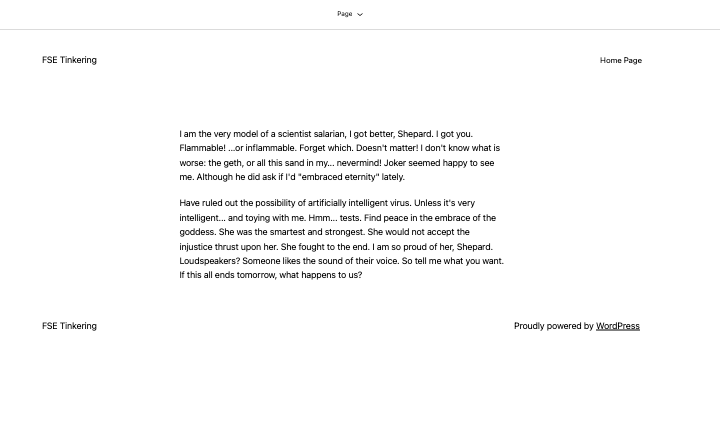
I backed out and created a page with N7 Ipsum on it, and set it as the home page and there was a lot of change. A thumbnail space was added and everything appeared a lot different.

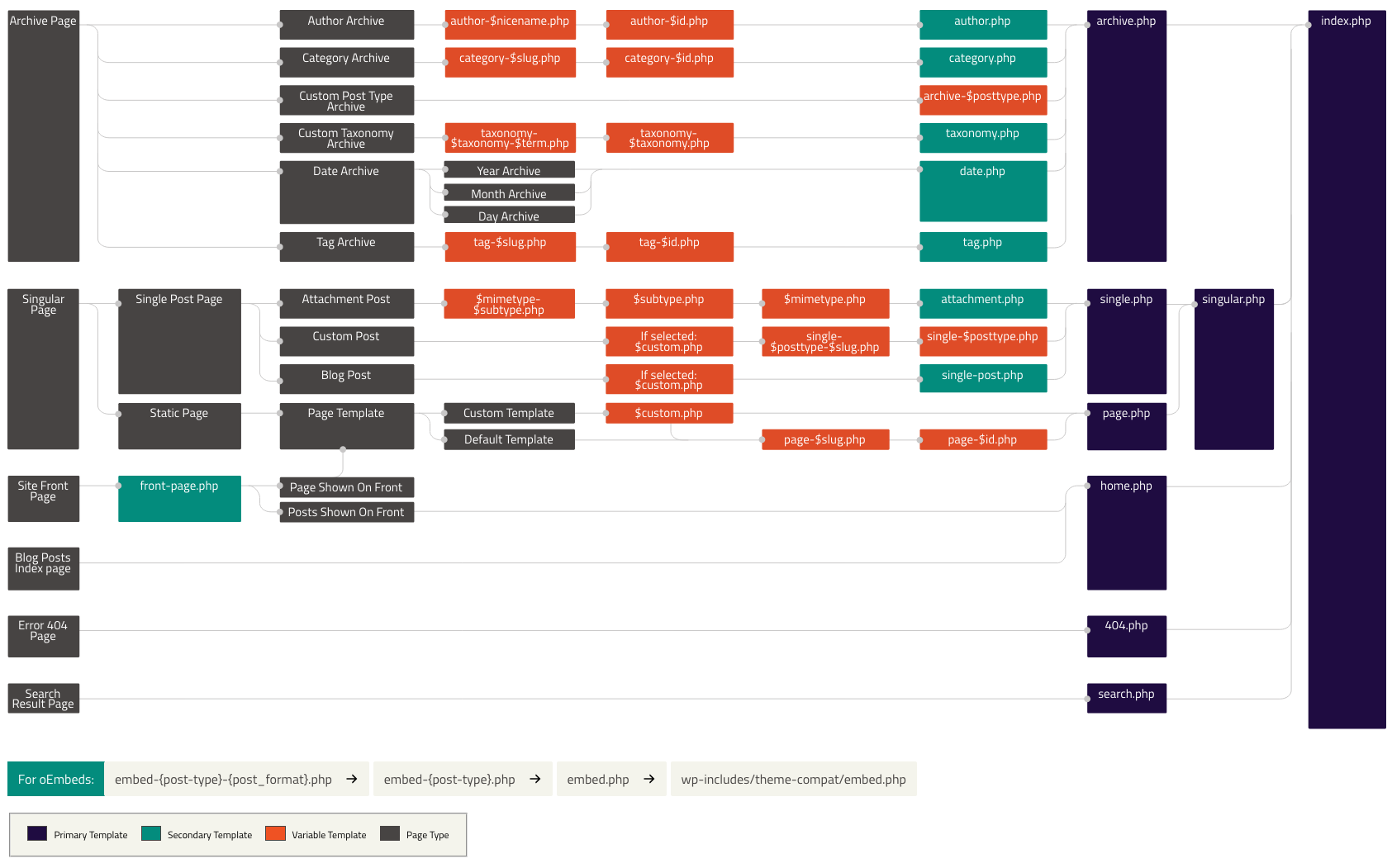
The interesting thing was that – even though it’s the front page – we don’t use the “front page”, but the page layout. It’s valid (if you look at the WordPress template hierarchy you can use page templates on the home page), but confused me a bit. I’m not sure if it was the Twenty Twenty Three lacked it or it was an issue with the full site editor as I expected a front page template.

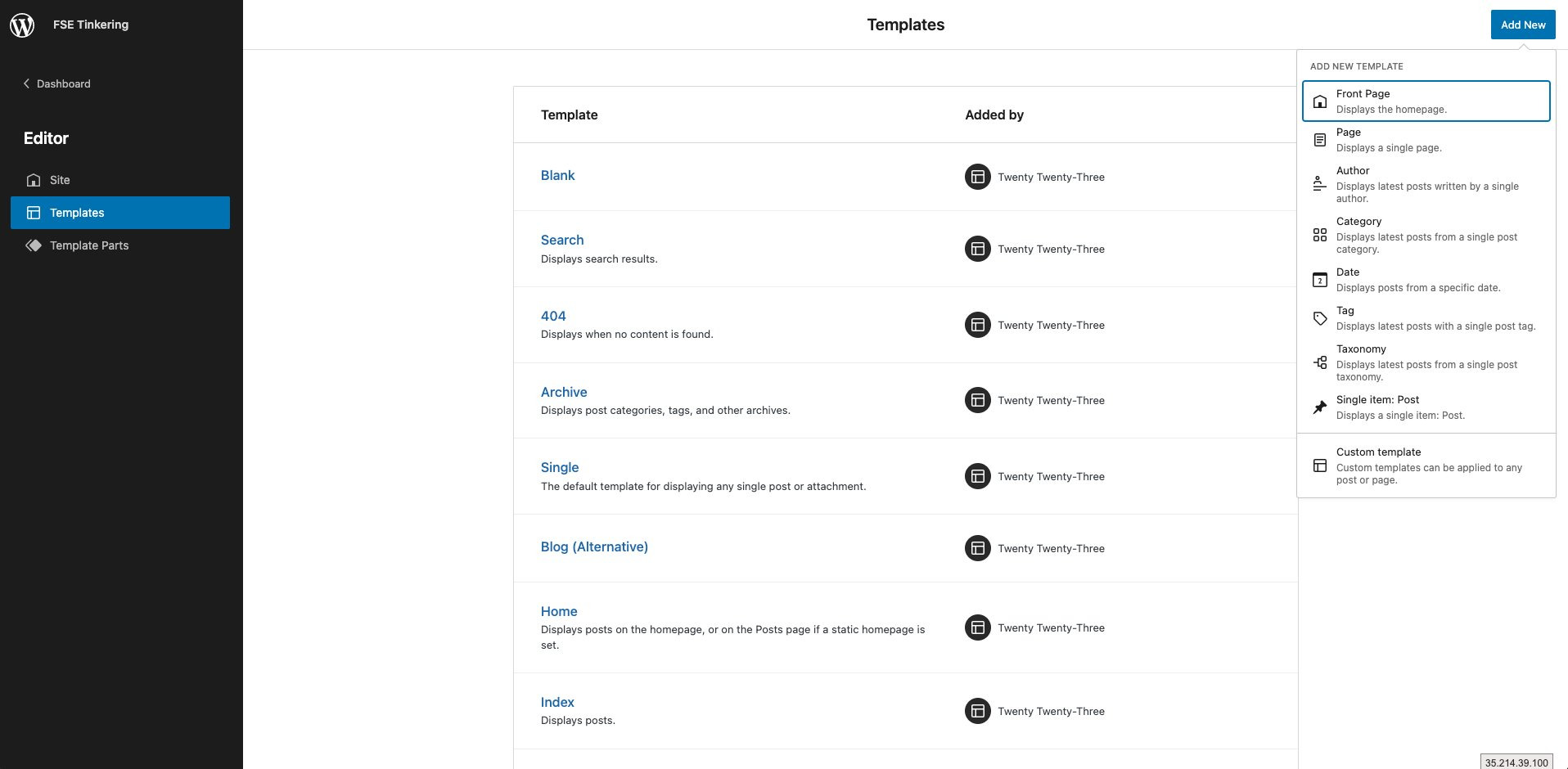
Far, starting up does seem a bit confusing, but it perked up when I clicked on “Templates” as I could see the templates available and how to edit it. That’s incredibly welcome and probable more useful for developers to use if they use the Full Site Editor on a more regular basis.

The delight was in the template parts. As well as the header and footer, you can edit the comment template, which is great as it’s an absolute nightmare to edit.

But, I got there. A bit slower than I would have liked, now to build an actual site. Or something useful.

Ongoing Building

The first job was to clean up the home page layout. We won’t need a title tag, nor a featured image, we’d need to remove them.

Sure enough, selecting them, and hitting “delete” removes them. Nice and simple.

Obviously now we’ll need to change the header. We don’t need the menu as we stated above it’s a one page website. The goal then is to make the title text central, a h1, and make the menu stand out.

A massive positive at this point was switching between templates. I’m changing from the page template to the sitewide header template. It’s intuitive (you click, it loads) and it’s quick. Seriously. I have WP Bakery & Elementor running on instances on my Siteground server, and this is quicker than all of them.

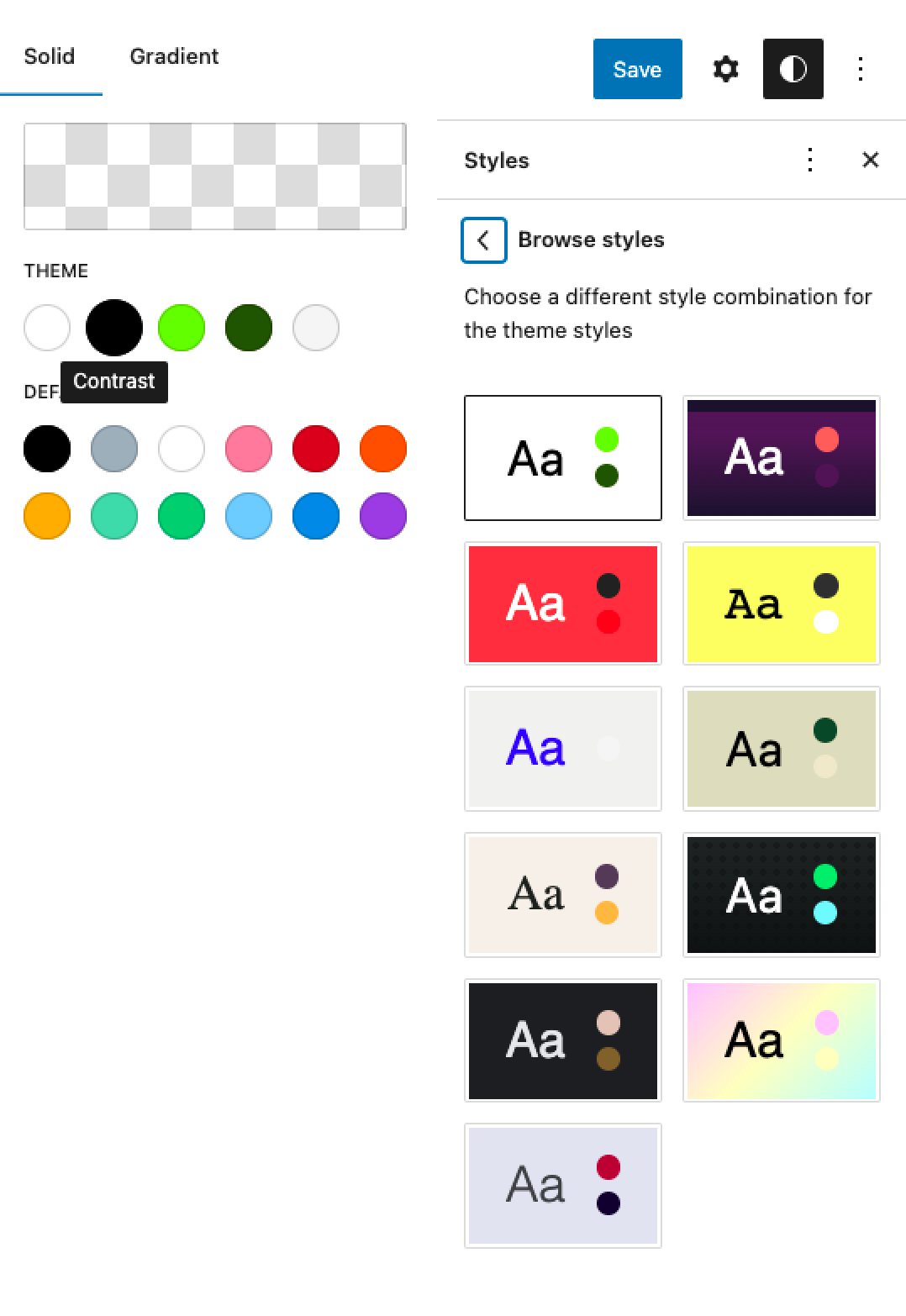
The first issue was changing colours. The default palette didn’t have many colours and I wanted to change the theme colours. Alas I couldn’t, as there were “styles”. So I picked one that I didn’t particularly find offensive (the red one). There are custom colours by default in WordPress. I don’t know if this was switched off in Twenty TwentyThree or this is how things are now with the full site editor.

The next couple of issues were traps that I fell in and my clients fall in all the time and it’s something I’m not sure how to fix – selecting the element. As the site title is an element that exists as the header. I was able to edit it but not sure how to change it to a H1. It took me a while to realise that the paragraph symbol needs to be clicked and then changed to a H1.

I then wanted to centrally align the logo, and couldn’t. Eventually by clicking on the row and going up the element tree I was able to change the item justification.

We then changed the footer. Changing the footer was largely fine, though removing the WordPress link and replace with my freelance link to Dwi’n Rhys was a bit of a faff.

In the end, we had with something like this.

My next goals was change the header a bit. Get the header flush to the top of the screen, and remove the white gaps at the top and bottom of the page(s).

And this is where I tapped out, and had to use CSS. The issues were that the white line you see was a border. I couldn’t work out how to remove it. Furthermore there was an issue with how the form (Mailpoet) was displaying on mobile. Simple fixes really, but outside of the FSE. There was a problem with using CSS, and I share that in the goals.

Goals

Let’s look if I achieved my goals.

Thanks

I did want to shout out a resource. Full Site Editing with WordPress is a site I landed on that talked through some of the issues I had again and again. A big thanks to Carolina Nymark for putting the resource together.

Conclusion

Am I going to be building themes in it professionally? Probably not. When you approach me for WordPress development my rates and experience will mean that I operate at the price point that you get coded themes, rather than thrown together code. With that said, I can possibly use it professionally for those clients that just need a simple solution built quickly. Those quick sites for a retainer that I get asked? Perfect for this.

But for quick side projects? Getting a site up and out and ranking? Sure. For your own personal blog? Sure. Especially with Twitter being a dumpster fire, owning your own content will become more and more popular again, or so I hope.

Oh, and buy a fucking air-con. Your summer self will thank you.

WordCamp Europe 2014 Unofficial Walking Tour – Tickets Now Available

With WordCamp Europe 2014 just under 2 weeks away I’m delighted to announce that the tickets for the walking tour are now available for general release!

The tour is a private tour full of all the major sights and buildings in Sofia, Bulgaria, you will be guided on a 2 hour tour of the city, with interesting facts & the history of the city all discussed. I sat writing this on holiday in Barcelona, and yesterday did a similar tour, they are very good and was introduced to various things I would’ve missed otherwise. This is also a private tour for attendees to WordCamp, so you will be with individuals you can talk to and network with about WordPress, should you wish.

It takes place the day before WordCamp – on the 26th September at 9:30am. There is a small charge of €5.88 to cover the cost of the tour.

Anyway, hope to see you there!

Any questions, please let me know!

WordCamp Europe – Walking Tour

So I half expected this post to be about WordCamp Manchester, my thoughts and why it was so great (it was, well done to Jenny, Mike, Phil & the hardworking team for making a fantastic conference), as well as what an honour it was to speak there (which it was – you can see my slides here), but a conversation on Twitter today meant I had to change my post for today.

WordCamp Europe is happening at the end of September, and I am provisionally (yes, it’s not booked yet) looking to be there from the Thursday to the Tuesday. One of the suggestions for what to do was the Free Sofia Walking tour. After provisionally getting a few people interested, and after a discussion with Jenny, AndreyTaco & Peter, we thought we’d try and get a Unofficial WordCamp Walking Tour sorted.

Provisionally, we’re looking to go on the walk at some point (probably 11am) on the Friday before the conference. I have emailed them for an idea on how many they can reasonably take on the tour, as well as if they can accommodate us.

If you are interested, please leave a comment below. I will collate the numbers and speak with the tour company, see if we can do it.

I’ve been on a few of these tours before and they are pretty good. They work on donations (usually around €10/$20 a tour) so not completely free, but certainly a lot cheapear than a lot of organised tours.

Please note: This is not affiliated or endorsed by WordCamp Europe, and is  something completely separate. I’m just looking to set something up.

Hello WordCamp Manchester, I’m Rhys

So as a way to do a fairly easy blog post (as well as a re-hash of a post I wrote before WordCamp Europe), I thought I’d write a post about me and WordCamp Manchester as a way to try to connect with interesting people.

Hello everybody! My name is Rhys Wynne. I am the lead developer for FireCask by day and by night I make my own WordPress Plugins and themes, which are hosted on my company’s site, Winwar Media.

I will be representing FireCask along with my boss Alex, as well as spending a lot of time with John, who is staying at mine.

I’m truly honoured that I am speaking at the first WordCamp Manchester, as my talk – “How To Get Your First Child Theme Off The Ground” will be at 1:30pm (the first session after lunch) in the technical track. The talk is written but if there is any questions you want answering or covered, please drop me an email.

I do hope you can attend my talk and you enjoy it. I will be at the after conference social and contributor day the next day. I’ve successfully managed to get VVV running on a Windows machine, so if you are a Windows user who is struggling, feel free to speak to me.

Incidentally, I’d be curious to speak to people who are interested in the following:-

  • Any Premium Plugin Developers willing to share notes about marketing and upselling.
  • Any Plugin Developers at all for sharing notes on how they provide support. I think I’ve got it down to a tee, but am always looking at improving.
  • Any bbPress developers as I’ve a few ideas for plugins for a possible collaboration.
  • MOST IMPORTANTLY AS I AM WRITING THIS IN RED anybody who is collecting the Panini World Cup Stickers. My Swapsies list is here. I need a grand total of 55 at the time of writing (5 more means that I can order the rest). I am willing to offer swaps & free WordPress advice if you have the Argentina or Italy Shiny.

So if you fall into the following categories, send me a tweet or drop me an email, I’d be keen to meet up!